

Before you play on mobile
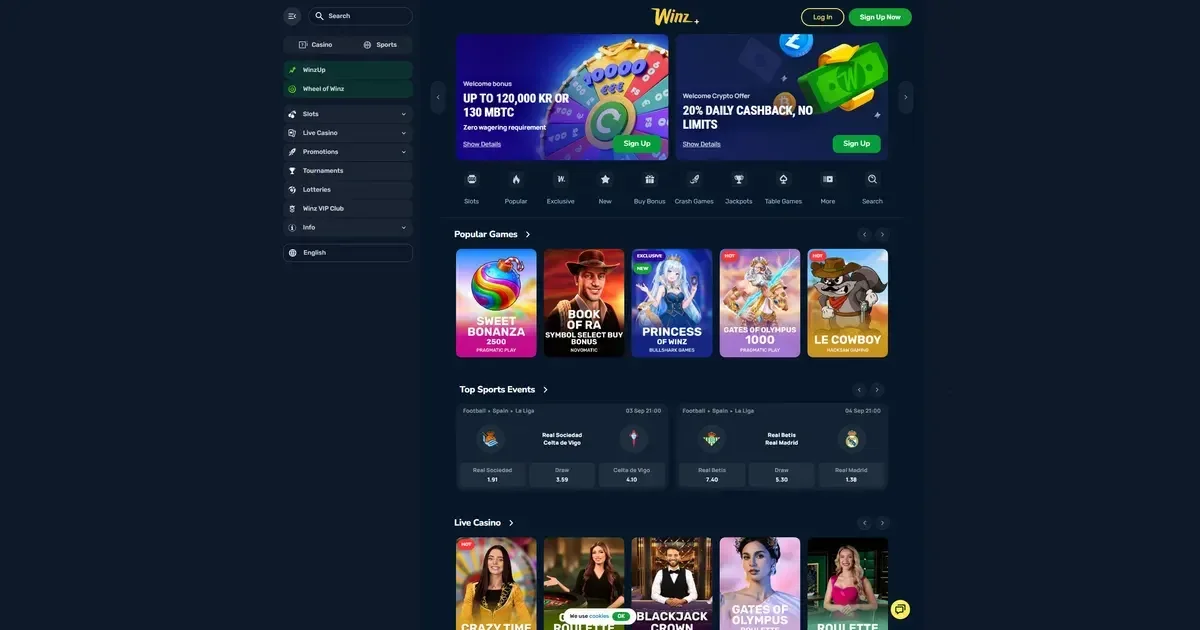
Winz runs in a mobile browser rather than as a downloadable app. That means you reach it the same way you would on a laptop: type the operator's address into Safari, Chrome or whatever browser your phone uses, log in with the credentials you set up at registration, and you are looking at the same account. No install, no permissions prompt, no separate login for the mobile version.
The site detects the screen size and rearranges itself automatically. Menus collapse into a hamburger icon at the top left, the game grid stacks into a single scrollable column, and the cashier sits behind a button rather than a permanent sidebar. It is a mobile-friendly layout, not a stripped-down version of the desktop site.
What you will not find: a native iOS or Android application in the App Store or Google Play. The operator offers browser access only. If you see an app listing claiming to be this casino, it is not theirs.
How access works here
Getting to the casino from a phone is a three-step process, and it is identical to the desktop flow:
- Open your browser and navigate to the operator's own domain.
- Tap the login button at the top right (or register if this is your first visit).
- Enter your email and password – the same credentials you use on any device.
The session persists until you log out or the browser clears its cache. On a shared or public device, always log out manually rather than relying on the timeout. The operator does not publish a session duration, so assume the session stays live until you close it.
Good to know: bookmarking the login page saves you typing the address every time. A bookmark opens directly in the browser rather than launching a separate app, which is exactly what you want here.
The cashier and support on a phone
The cashier button sits at the bottom of the screen once you are logged in. Tap it and you see the same deposit and withdrawal options as on desktop: Visa, Mastercard, bank transfer, Jeton, and twelve cryptocurrency coins including Bitcoin, Ethereum, Litecoin, Tether and Solana.
Deposit minimums stay consistent across devices – 20 EUR for fiat methods, variable minimums for crypto depending on the coin. The withdrawal process is the same too: select the method, enter the amount (minimum 20 EUR), confirm. Processing times do not change because you requested the payout from a phone.
| Method | Min deposit | Min withdrawal | Processing |
|---|---|---|---|
| Visa / Mastercard | 20 EUR | 20 EUR | Instant |
| Bank Transfer | 20 EUR | 50 EUR | 1–5 days |
| Bitcoin (BTC) | 0.0001 BTC | 0.001 BTC | Instant |
| Tether (USDT) | 20 USDT | 20 USDT | Instant |
| Jeton | 20 EUR | 20 EUR | Instant |
Support channels work from mobile without issue. The live chat icon appears in the bottom right corner; tap it and a chat window opens over the game grid. Email support is reached the same way: through the contact form in the site footer, which reformats for touch input on a small screen. Both channels operate 24/7.
Verification documents can be uploaded from a phone's camera roll. The KYC section asks for a photo ID, proof of address and proof of payment – the same requirements as on desktop. Snap a clear photo of each document, upload through the account settings, and wait for confirmation. The operator triggers KYC at cumulative withdrawals over 2,000 EUR or before processing a payout, whichever comes first.
What a player can actually do from a phone
The game library on mobile mirrors the desktop catalogue: over 6,000 titles spanning slots, live dealer tables, table games, crash titles and game shows. Search and filter tools sit at the top of the game grid, letting you narrow by provider, mechanics or genre. Tap a thumbnail and the game loads in portrait or landscape, depending on the title.
Live dealer games run well on a 4G or 5G connection. The stream quality adjusts to your bandwidth automatically, dropping resolution if the connection weakens rather than stalling the feed. Chat with the dealer works through a text box at the bottom of the screen; the dealer reads messages aloud and responds on camera.
The sportsbook occupies its own tab in the main menu. Tap it and you see the same 35 sports markets as on desktop, including football, basketball, tennis and esports titles like CS2, Dota 2 and League of Legends. Odds formats switch between decimal, fractional and American in the settings panel. Cash-out and live betting both function from a mobile browser.
What stays accessible:
- Account settings – change your password, set deposit limits, review transaction history.
- Bonus activation – claim the Wheel of Winz spins, apply a promo code, check wagering progress.
- Responsible gambling tools – impose deposit, wager or session limits through the account controls.
- Transaction logs – every deposit, withdrawal and bet is recorded and visible in your account overview.
Game performance depends on the device. Older phones struggle with graphics-heavy slots; the reels spin but transitions lag. A mid-range Android or iPhone from the last three years handles the library comfortably. Battery drain is steeper than browsing or messaging – expect an hour of continuous play to cost 15–20% of your charge.
What gets cramped on a small screen
Some parts of the site work better on a large display. The live casino lobby shows fewer tables per screen on a phone, so scrolling through the full selection takes longer. Game thumbnails shrink to fit the narrow viewport, making it harder to distinguish one slot from another at a glance. The sportsbook's in-play interface crams match statistics, the bet slip and the stream into a single scrollable column – workable, but tighter than the split-pane desktop layout.
Multi-table play is not realistic on a phone. Opening two live blackjack tables at once forces constant tab-switching, and you will miss the action at one table while betting at the other. Stick to a single table on a small screen.
Text entry – typing a withdrawal amount, filling out a contact form – can be fiddly on older phones with small on-screen keyboards. Autocorrect occasionally mangles email addresses or numeric amounts, so double-check before you submit.
Portrait versus landscape: most slots default to portrait orientation and look fine that way. Live dealer games and some table titles prefer landscape, which gives you a wider view of the table but makes the chat box harder to reach. You cannot force a game into the other orientation – the title decides.
Battery, connection and session length
Playing from a phone introduces variables you do not have on a desktop machine. A weak signal disrupts live streams and can disconnect you mid-spin. A public Wi-Fi network might block gambling sites entirely. Your battery level limits how long you can play without a charger.
Here is what to check before you start:
- Connection strength – 4G at three bars or better, or a stable Wi-Fi network. A single bar of 3G will stutter on live dealer games.
- Charge level – at least 40% if you plan to play for more than half an hour. Plug in if you can; continuous screen-on time eats the battery faster than most other activities.
- The operator's own address – bookmark the correct domain rather than typing it from memory. Mistyped casino addresses often lead to phishing sites designed to look legitimate.
- Shared device – if someone else uses this phone, log out when you finish rather than staying signed in. The session persists across browser restarts until you explicitly log out.
Set deposit and session limits before you play, not during. The controls sit in the account settings under Responsible Gambling. Choose a deposit ceiling for the day or the week, and stick to it. The operator enforces the limit you set – there is no override once it is active.
Staying in control on a device you always carry
A phone in your pocket means the casino is always within reach, which is convenient until it stops being convenient. The same tools available on desktop – deposit limits, wager caps, session timers, self-exclusion – work identically on mobile. Use them.
The operator provides deposit limits, wager limits, session time limits and self-exclusion through the account settings. A deposit limit prevents you from adding more money than you agreed to in a given period. A session timer logs you out automatically after the time you set. Self-exclusion locks the account for a chosen duration, and you cannot reverse it early.
UK-based support is available through GamCare at www.gamcare.org.uk or the National Gambling Helpline on 0808 8020 133 (free, 24/7). BeGambleAware (www.begambleaware.org) offers advice and self-assessment tools. If you want to block gambling sites across all browsers and apps, Gamban (gamban.com) and BetBlocker (betblocker.org) both work on iOS and Android.
This content is published for information and marketing purposes. We are not a gambling operator, bookmaker or organiser of betting or gaming activity. Access is limited to those 18 and over (18+). Free, confidential support with gambling is available at BeGambleAware.org.